



Adobe Illustrator is a go-to tool for vector illustration, lettering, and graphic design. And when you want to add a little more texture, character, or creative flexibility to your work, Illustrator add-ons can help you get there.
The term add-on covers a few different things. Some tools extend Illustrator with new features, while actions, brushes, and effects help you create a particular look or speed up a repeat task. This roundup brings together 15 options for making vector artwork feel more personal—from vintage print textures and chalk lettering to custom fonts and hand-drawn brushwork.
1. Fontself
Want to turn your lettering into a typeface? Fontself lets you create fonts from your own letters, icons, and symbols directly in Illustrator. It’s a useful tool for designers who want to take custom lettering beyond a single design.
2. Gold Rush For Illustrator
Add a little shine to your artwork with metallic, glitter, and foil effects. Gold Rush includes a collection of swatches for bringing a luxe finish to lettering, illustrations, and decorative details.
3. VectorPress: Illustrator Press
Give vector artwork the character of vintage print with rough ink, halftone, distressed, and gravel effects. VectorPress is worth exploring when you want your design to feel a little less pristine and a little more printed.
4. ChalkBox — Illustrator Actions
Bring the look of chalk lettering to logos, type, and icons with a set of Illustrator actions. The package also includes chalkboard backgrounds, giving you a ready-made backdrop for that hand-drawn finish.
5. The Dot Shop — Illustrator Actions
A quick way to bring retro halftone texture into your designs, The Dot Shop includes 15 actions inspired by pop-art printing. Use it to give lettering and graphics a punchy, vintage print feel.
6. PosterPress for Illustrator
Give your design the look of an old-timey travel poster or vintage postcard with this finely crafted Illustrator plugin. Includes a range of wonderful old travel photos to help get you started.
7. Pattern Studio
Tired of using the same old lame borders and patterns? Then make your own with this powerful plugin. With the included brushes, symbols, swatches actions, any number of rustic, hand-crafted creations are possible.
8. Inkblock Illustrator Actions
From the makers of the ChalkBox Actions above, another authentic plugin to help you add that subtle grunge texture to next your cafe logo or boutique beer label.
9. CraftType — 3D Sign Painting Actions.
Inspired by traditional storefront lettering, CraftType helps give typography a dimensional, hand-painted sign look. Try it for vintage-style lettering, shop graphics, and designs that call for a little old-school charm.
10. Watercolor Fantasies Quick Styles AI
Add a softer finish with watercolor-inspired styles for Illustrator. Watercolor Fantasies offers an alternative to distressed and grunge effects, bringing a painterly touch to illustrations and decorative graphics.
11. Vintage Comic Press — AI Actions
Bring comic-book print character to your designs with layered colour effects, halftone variations, shadows, and text outlines. Vintage Comic Press is a fun option for artwork that takes its cues from classic printed comics.
12. Ink Streak — Illustrator Actions
For a loose, imperfect ink finish, Ink Streak adds expressive marks to your artwork without needing to create each one by hand. Use it to introduce a little variation to lettering, illustrations, and graphic details.
13. 300+ REAL MARKERS FOR ILLUSTRATOR
For a loose, imperfect ink finish, Ink Streak adds expressive marks to your artwork without needing to create each one by hand. Use it to introduce a little variation to lettering, illustrations, and graphic details.
14. Dragstrip | Illustrator Brush Kit
Dragstrip offers brushwork inspired by real hand-painted strokes. Reach for it when you want your vector lettering or illustration to feel energetic, loose, and made by hand.
15. Hand-made linocut brushes
Get the look of traditional linocut printing with a set of handmade brushes. Their textured, carved quality can bring a distinctive printmaking feel to illustrations, posters, and decorative artwork.
How to Choose the Right Illustrator Add-On
The best Illustrator add-on depends on what you want to make, or what you’d like to make easier.
- For custom lettering: Look for tools that help you create or style type, such as Fontself or sign-painting actions.
- For texture and print effects: Try halftone, distressed, comic, or ink effects to give clean vector artwork a more tactile finish.
- For illustration: Brushes can introduce the character of markers, paint, or linocut into your vector workflow.
- For repeat tasks: Actions can help you apply a particular treatment without rebuilding the effect from scratch.
Before downloading or purchasing any add-on, check the product listing for its supported Illustrator version, file formats, installation instructions, and whether it requires additional software. The current list includes different kinds of assets, so it’s worth checking how each one works before adding it to your workflow.
Illustrator add-ons are tools or assets that extend or complement the software. They can include plugins, actions, brushes, and effects that help with tasks such as creating textures, styling lettering, or building illustrations.
A plugin adds functionality to the application, while an action automates a sequence of steps or applies a particular treatment. Brushes and effects are other kinds of resources that can support your Illustrator workflow. Adobe’s developer documentation also distinguishes plugins from scripts and other extension types, so it’s useful to check how a specific product is described.
Many Illustrator brushes and actions are designed to work within vector workflows, but the exact result depends on the product. Check the listing details to see what it creates, which Illustrator version it supports, and whether any effects are raster-based.
Creative Market has a collection of resources for Adobe Illustrator, including brushes, presets, and plugins. Browse the Illustrator Brushes & More collection to explore more options
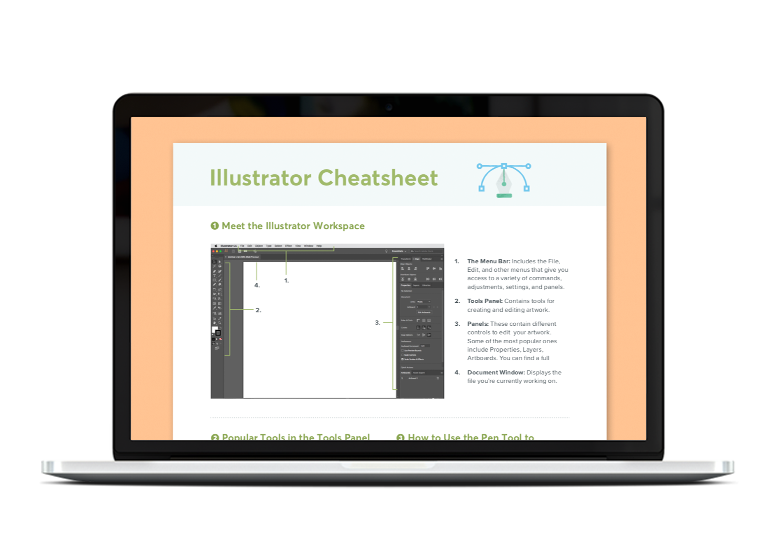
A handy PDF guide listing tools, shortcuts, and unique Illustrator features.
Download it here







25 Comments