Categories / Shop Center

Are You Making These 9 Mistakes in Your Product Descriptions?

RetroSupply Last updated: March 28, 2024 · 7 min read

You know the feeling. You work for hours on a product only to find that it only sells a handful of copies. No doubt a great product is essential to success. And creating great screenshots is a must. But did you know there’s something else that can have a huge impact on sales?
Any guesses?
If you said your product description, you’re right! Your product description is the second most looked at area on your page. And it’s a real bummer that it’s so often neglected, because it can have a large impact on your sales.
So why are product descriptions so important? Because even if your product solves a problem and looks great, 99% of your potential customers have questions. And if you don’t have answers–they’re not buying.
Here’s a list of 9 common mistakes shop owners make in their product descriptions:

1. Not Providing Enough Information

By far the most common mistake. After we’ve spent hours working on a product it can be temping to write a short description and release the product. The problem is, customers need all their questions answered before they buy, and the best way to do that is by providing the right information.

The Solution

Pretend you’re a new designer. Provide enough information to answer every question you can imagine a new designer asking. Although some information might seem obvious to you, often times it’s not to your customers.
Pro Tip: Ask another designer to look at your product description (without images). Give them 15 seconds to scan your description and then ask them to describe the product to you.

2. Not Using Specific Details

Have you ever read a product description that leaves you with more questions than answers? Not providing specific details about a product can be frustrating for customers. But even worse, it makes them not want to buy your product. Even if they think they’ll love it.

The Solution

Pack your product descriptions with as many highly specific details as possible. Include quantities, dimensions, software versions, resolution, and anything else that eliminates uncertainty in your customers.
Here’s an example:
Bad Description: A collection of paper textures you can use for backgrounds.
Better Description: 7 high resolution (3000×5000 pixel) paper textures scanned from 140lb 100% cotton paper.

3. Writing Paragraphs Larger Than 3-4 Sentences

Have you ever read a product description that was just one never ending paragraph? It makes trying to read the description into a crazy word search.
Long paragraphs are hard to scan. Plus they look like a lot of work to read. Many customers (including myself) will read a few sentences and then give up.

The Solution

Write easy to read 3-4 sentence paragraphs when possible. Writing to sell is all about making it easy for customers to find information. Don’t bury the awesome details of your product in a word mountain.

4. Not Providing a CTA (Call To Action)

It’s amazing how often product descriptions are missing a call to action. It’s easy to assume potential customers will purchase if they like the product. But after reading about a product, a friendly nudge to buy can help customers make the decision to buy now instead of never.

The Solution

At the end of your description, have a clear and direct call to action. This could be as simple as “Buy now and start using my awesome font”.

5. Not Using Bullets or Numbers

When customers are deciding to purchase your product, one of the first things they’ll do is scan your description for all the details about the product. If the information they need is hard to find with a quick scan, they might miss it or give up.

The Solution

Use bullet points and numbered lists liberally.
Tip: You can press Option+8 on your Mac or Alt+0149 on a PC to get a bullet point.

6. Writing Like a Robot

Writing has never come easy to me. Every time I’d write something it sounded like it was written by a robot. I blame it on too many high school and college papers!
But after spending 18 months working for this blog, I learned that good writing when you’re selling needs to radiate authenticity and friendliness.

The Solution

When you write your product descriptions, pretend like you’re talking to a good friend. Imagine you’re telling them all the cool details of a new product you discovered.
Pro Tip: Record yourself pretending to tell a friend about your new product. Write down what you said, edit it, and use this as your copy.

7. Using Big Words

Using big words is great for academic writing. But if you’re trying to sell a product, the easier it is to read, the better.
I recently heard CNN tells their reporters to create content for an 8th grade education level. Not because viewers aren’t educated, because it makes taking in information easier.

The Solution

Aim for shorter sentences and smaller words. Want a quick way to check your writing? Check out Hemmingway App.

8. Not Providing Social Proof

No matter how much good stuff you list off in your product description potential customers are going to be suspicious.
Why? Because you want to sell your product. You have a conflict of interest. People want proof from other customers that the product is going to satisfy their needs.

The Solution

Provide testimonials from customers in your descriptions.
Here are a few easy ways to get testimonials:

  • Provide a group of your biggest fans with early access to the product for free. Ask them for their feedback. Get permission to use the positive feedback as testimonials.
  • Search the comments below your product. Write a private message to those who leave positive comments asking if you can post them as testimonials.
  • Often, customers will email or tweet about products they love. When they do ask them if you can use it as a testimonial in your product description.

Pro Tip: Use the customer’s full name and job title whenever possible. These specific details make your testimonials more credible.

9. Not Providing Links to Additional Details

On occasion, a product requires more details than you can provide on Creative Market alone. For example, a large photo collection. In these cases, it’s important to provide links to additional material to help customers make a purchasing decision.

The Solution

Add additional information on trustworthy and popular sites. Not only will customers feel comfortable visiting the other site but it gives you an opportunity to get a new follower.
Here are a few places to feature additional details:

  • Behance: Additional images
  • Vimeo: Product demos
  • You Tube: Product demos

Note: It’s important that you consider carefully whether the additional details are necessary. Anytime someone clicks a link that leaves the site you’re selling on, there’s the chance they won’t come back. If you do send them to a different site, be sure to include a call to action on the other site as well as a link back.

Bottom Line: Make It Easy for Potential Customers to Find Information

Your goal is to eliminate as much friction as possible from the buying process. By crafting customer-centered product descriptions you can help more people find what they’re looking for (and put more money in your pocket).
I’d love to hear your ideas! Do you have any tips on improving product descriptions? Let me know in the comments below!
Dustin Lee is the owner of RetroSupply. He’s also launching a new site called GrainBureau, offering tutorials and free graphic design resources.
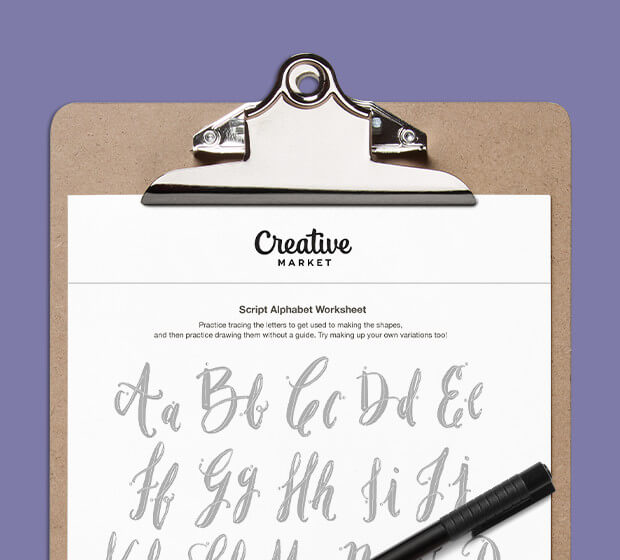
Lettering Worksheets
Getting started with hand lettering?
Free lettering worksheets

Download these worksheets and start practicing with simple instructions and tracing exercises.

Download now!
Tags:
About the Author
Author
RetroSupply

RetroSupply makes brushes, textures, fonts, and templates for retro-loving illustrators and designers. Our products are made by a full-time team of creatives for use in Procreate, Photoshop, Illustrator, and Affinity.

View More Posts
Go to My Shop
Related Articles
32 Comments
  • Another great article, thanks Dustin. Another tip is to not just simply copy and paste descriptions from other products as that will lead to what search engine consider "duplicate content" - you always want to make sure all product descriptions are unique as it follows best practices for SEO. 12 years ago
  • Thanks @Derek Stevenson ! That's a great tip! Thanks for sharing : ) 12 years ago
  • Awesome and helpful as usual, @Dustin Lee ! Thanks so much! And a good point also, @Derek Stevenson . I've read a few descriptions that tell a background story about the product, and these are fun to read also. I've used FAQs to expand on my product listings before, for instance, what fonts I used, etc, if the description starts to get too long. That way, people who are interested can read further and those who aren't interested will move on. 12 years ago
  • I need to start telling a story with my products. The olde saying goes "facts tell, stories sell" - you never see anyone standing in front of the nutrition chart at McDonalds... facts just don't sell! 12 years ago
  • Awesome points, Dustin! I always feel silly describing my products, but this article made me realize just how important it is! Loved the "the solution" format :) 12 years ago
  • Writing a quality description is always tough and definitely super important to successfully convey what an item is all about. You want to be both concise and detailed, which can be a tricky balance. Thanks for the write up @Dustin Lee - your descriptions are always a fun read =). 12 years ago
  • @Beth Rufener Really great ideas! Background stories are so great! I think sometimes people are afraid they'll be too mundane. But I always love to hear how designers create their work. I also really love the idea of using the FAQ to expand upon details as well. I might have to start doing that ; ) @Derek Stevenson I've never heard that expression but I love it! @Shelly Laslo I think you should definitely tell stories and add more info. Especially since your products are so full of personality. I really love this one: http://crtv.mk/dbxk and this one: http://crtv.mk/dbxk – Your work is so good I would include more images to showcase it : ) Thanks @Matt Borchert They are hard to write! I also need to do a better job of reviewing my copy and updating it. That's definitely one of my weaknesses. Your descriptions are looking great. I just read this one and you do a great job of providing all the necessary details: http://crtv.mk/bbve Thanks everyone! Your insightful comments always make stuff waaaaay better. : ) 12 years ago
  • @Dustin Lee another awesome post. Thank you so much! 12 years ago
  • Love this series @Dustin Lee. Got some great tips here that I will definitely be experimenting with on future products. I especially like the idea of creating product demos on Vimeo and Youtube. 12 years ago
  • Fantastic post @Dustin Lee am currently writing product descriptions for my website so have pocketed this for later :) xx 12 years ago
  • Another great set of tips, Dustin. Can't wait to see what else this series brings. 12 years ago
  • So glad you posted these great ideas! This was a really good and informative read. Now to apply this thinking. 12 years ago
  • @Mia Charro Thanks! I'm really glad you're finding it useful! @FilterGrade Thanks. YouTube and Vimeo are great for helping people get an inside look at your products. I love Vimeo. @Matt Borchert and @Ian Barnard have also done a great job with using videos as a tool to sell and share. @Jennie Whittaker Awesome! I hope it helps : ) @Sam Jones Thanks, Sam! It's been a blast to do this series. It's also helped me to be more purposeful in my own marketing tactics. @Jason Heglund Thanks, Jason. Much appreciated : ) 12 years ago
  • @Dustin Lee Excellent tips, Dustin! I've still yet to add more social proof and video tuts to my products, so this was a good reminder to start doing so. 12 years ago
  • @Gerren Lamson I wasn't surprised when I started implementing social proof and seeing good results. But I was REALLY surprised at how much people value video. I made demo videos at first as a fun thing but they quickly became something that customers loved. : ) 12 years ago
  • @Dustin Lee Good to know. 12 years ago
  • A great and very practical article. I realize that product description is one of the points I must care and improve. 12 years ago
  • It's really very amazing and helpful. Will give it a shot. Thanks .. :) 12 years ago
  • Anonymous
    Very helpful information, great Thanks 12 years ago
  • Anonymous
    Great tips and inspiration! Thank you @Dustin Lee! There definitely much I can improve in my shop :) 12 years ago
  • Thanks for this @Dustin Lee. I'm constantly thinking about product videos but I have a horrible Dutch accent when I'm speaking English. I think I just have to get over it and make them. 12 years ago
  • Oh, just when I thought I'm good at writing description, these new tricks rained on me like a cold shower. 12 years ago
  • Anonymous
    @Dustin Lee Great post, just read it right now - still have to improve on my product description @Thom Bouman This is funny, because I thought the same. What about text instead of spoken words? Or infographics? Might be a designer's choice...Maybe this is an option for you as well? 12 years ago
  • @Marie Wagner I just did it and gotten over it. :-) https://www.facebook.com/freshdesignelements/app_349313058487732 It sounds like a Dutch guy speaking English but hey that's only my problem. I know that when I'm watching instruction videos I really dislike reading notes because it distracts from me looking at the interface. "Keep your eye on the cursor." I say. And I have to stop the movie every time. So Marie, go for it. You can edit it and do it over and over. You'll get better at it. 12 years ago
  • Anonymous
    @Thom Bouman Great - just watched the video, but who cares that you have a tiny teeny accent? I love it. Just would love to know if it pays out to make videos? Still struggling with the idea, because I do everything next to my real job...Thanks for an opinion on that. 12 years ago
  • @Marie Wagner Thanx, yes it pays out. People see exactly what they get and how (easy it is) to use it before they buy. Plus your Youtube channel or Facebook page gets more exposure. I'm doing all this also beside my job as an art director. I'm working days and evenings. I have 2 companies now. It's a lot of work but there is progression in sales partly due to the tips in this blogpost. This is the software I use to make the screencast. ScreenFlow: http://origin.telestream.net/screenflow/ 12 years ago
  • Anonymous
    Wow - crazy schedule you've got there @Thom Bouman Thanks for the tipps and also for the programme idea. After the christmas holidays I will for sure update my descriptions and work on added youtube content. 12 years ago
  • @Dustin Lee great article, I'd like to give more ideas to the discussion. It's good to use tracking links in CTA of product's description. Buy that way we can know which links people actually click which means CARE about, if there are links that nobody clicks better to remove it in order to keep the description FOCUSED with clear CTA. We've just released eMax HTML template and started using it at here http://goo.gl/0qtlAv Another point is "Testimonials", if there are first customers already, we might put "quotes" from them. Good trust points. Cross promotion other products on CreativeMarket is welcomed :). Put the links referral to other items of your shop. The "Change log" might help with trust. If the user see freshly updated change log he is confident that the developer is really care about his products. Better for long term investment and buy further products from a developer. Right now I see only the "date of publishing" the item in the description. That's all for now :). All the best, Tony Bui. 12 years ago
  • Nice article, Dustin Lee, thank you! 10 years ago
  • Thank you for a great article @Dustin Lee After reading [@Derek - Creativenauts](user:13786) ´s comments, I am not sure if I am making a mistake with my descriptions as I usually copy the general info(with few changes like the design name or file contents etc,.) of my previous product and leave the rest as is. Just a sample of my last product https://crmrkt.com/lgE29l where the second half of my description is more or less same for all my products. Definitely this article gives me an insight into how I can further improve on my future descriptions but it would be great if I could get some feedbacks based on how I´ve put together my description. Thanks a ton :)!! 9 years ago
  • How do i put the bullet points? I cant separate the lines or anything :( 9 years ago
  • So, I noticed that some of my descriptions have been changed and they DO sound like they were written by a robot or poorly translated. It's disappointing to have to go back and change them to be actually descriptive instead of "winter stock photo" or something like that. It's a poor use of my time. 6 years ago