Categories / News

New Dropbox Sync: Never Lose Another Design Asset

Aaron Epstein Last updated: March 26, 2024 · 2 min read

One of the best things about buying all of your design resources on Creative Market is that they’re all saved in one convenient place: the Creative Market cloud. So you’ll always know where to go to access your personal design toolkit, whenever you need it.

But we wanted to make it even easier! So starting today, if you’re a Dropbox user (and who isn’t?), we’ll automatically add all of your purchases to your Dropbox so you’ll never have to go hunting through your messy downloads folder to find your design assets again.
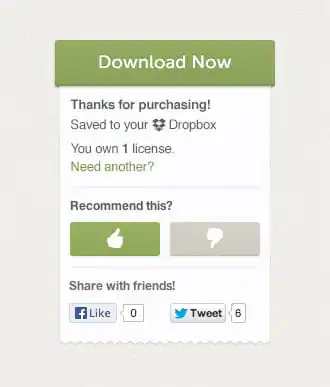
Saved to Dropbox

To turn it on, just visit your account settings to connect Dropbox to your Creative Market account, and then every product you buy in the future from Creative Market will automatically appear in your /apps/Creative Market folder in your Dropbox. Magic!
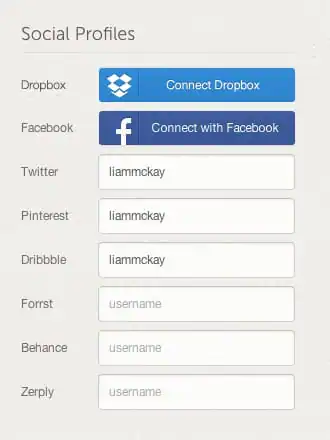
Connect Dropbox

Connect your Dropbox account →

And if you want to sync your past purchases to Dropbox too, just click on the “Sync to Dropbox” link in the purchase receipt on any product page, or else click on the Dropbox icon next to each product you want to sync on your Purchases page, and all of your purchased files will sync over to Dropbox too.

So if you’re tired of losing track of all of the assets you’ve purchased over the years, we hope this integration makes buying and managing all of your design resources on Creative Market an amazingly simple experience.
Lettering Worksheets
Getting started with hand lettering?
Free lettering worksheets

Download these worksheets and start practicing with simple instructions and tracing exercises.

Download now!
About the Author
Author
Aaron Epstein

Creative Market cofounder. Jack of all trades, master of none. Designer/developer hybrid in a previous life. Powered by Cheerios and avocados.

View More Posts
Go to My Shop
Related Articles
54 Comments
  • cool idea ;) 13 years ago
  • You read in my mind again...I'm really scared :S 13 years ago
  • Yeah, I'm with Pier. You read my mind. I do this constantly to make sure I don't lose valuable stuff. Thanks, already enabled it. : ) 13 years ago
  • Wow! Amazing! That's a great idea! 13 years ago
  • Great idea! 13 years ago
  • oh no, not another service combined with an not selfhosted cloudservice. Plz consider to manage a 'owncloud' bridge, too... for all the paranoid among us ; ) cheers 13 years ago
  • That saves me a bunch of time. Excellent idea! 13 years ago
  • This is fantastic, great idea! It does get me thinking a bit about other integrations, so I'll just throw this out there. What if sellers could link their Github account and assign a product to a particular repo? I realize this is much harder to accomplish and I certainly don't expect it. Just thinking out loud. 13 years ago
  • How awesome is that! 13 years ago
  • Excellent. I use Dropbox to manage assets and workflow with freelancers around the world. Great system. 13 years ago
  • what about syncing products to dropbox and google drive for authors? Like if we make an update, it will look for modified file date and automatically upload the updated file to author product page. 13 years ago
  • Very useful... great idea! 13 years ago
  • Thanks guys, what a great feature - will try it right away! 13 years ago
  • Awesome 13 years ago
  • Worked beautifully! Thank you for making this awesome feature available to us. 13 years ago
  • Ha this is pretty cool. A leg up on alternative marketplaces for sure. :) 13 years ago
  • That's actually a very good idea. 13 years ago
  • Brilliant - many thanks for implementing an excellent feature. 13 years ago
  • This is awesome! 13 years ago
  • @Derek Stevenson I'm sure this feature will evolve as we move forward, there's a lot of interesting ideas we can explore :) 13 years ago
  • @Liam McKay very cool, I love the fact that customers can have peace of mind that their files are automagically delivered to their dropbox account. 13 years ago
  • Great Feature !!! 13 years ago
  • Nice feature! Looks very helpful :) 13 years ago
  • Awesome! 13 years ago
  • oh yeah, nice feature. 13 years ago
  • Genius! Absolutely genius. xo 13 years ago
  • You rock! :) Thanks, CM! 13 years ago
  • Awesome feature. Kudos Creative Market team! 13 years ago
  • This is wowsome!! 13 years ago
  • Awesome :) 13 years ago
  • Great news! 13 years ago
  • This is great! 13 years ago
  • This was a great idea! Now I don't have to manually add them. Way to go. 13 years ago
  • Brilliant! 13 years ago
  • Great feature. Much appriciated. 13 years ago
  • creatively awesome! 13 years ago
  • BULLSEYE :) 13 years ago
  • Thank you! I get these products at work too so they are saved onto my work laptop but home, so this is great. 13 years ago
  • Great Idea n time save! 13 years ago
  • best idea! 13 years ago
  • Yeee haaa... i super likes this one. 13 years ago
  • I am very grateful for this new feature and added benefit from your website. I can honestly say, little touches like this to let your customers know that you really want to support them as much as they support you - go a long way. It makes me think about CM as my first stop for a creative aid or tool instead of some other "markets." Good job. Well done. 13 years ago
  • Waiting for a Google Drive Sync :) 13 years ago
  • great addition! Thank you! 13 years ago
  • Awesome feature! 13 years ago
  • I had my resources on Amazon cloud because my Dropbox is almost full - now I'm going to have to rethink! Awesome idea guys. Keep 'em coming. 13 years ago
  • Really good feature. Thank you Creative Market team! 13 years ago
  • *she stumbles on this JUST as she came to CM to re-download something she KNEW she purchased, but just couldn't find....* Thank you for freeing up a few more of my brain cells! 13 years ago
  • Great feature but you have to delete them from your download folder so you don't have conflict and more chaos! 12 years ago
  • What if i deleted the files form the folder accidentally? Can I tell CreativeMarket to download them again to my Dropbox folder? 11 years ago
  • I'm late to the party on this, but I must say this feature has been a lifesaver for me recently. THANKS! 11 years ago
  • is it possible to change the folder location as I usually use my Mac apps in the folder called "Apps" in my dropbox. I rather have them placed in "Design resources>Creativemarket". Anyone clever enough to answer this? 10 years ago
  • will this feature ever be available for other storage platforms? I just switched from Dropbox to Box 7 years ago